

If you’ve ever stood on a factory floor for a 12-hour shift watching heavy machinery churn out industrial products, you know how much a machine’s interface can make or not just the workday — but the accuracy, safety, and overall success of the entire production run. As a Skirt Belt Machine supplier, I get dozens of questions every week from potential clients about this very topic: does our equipment have a user-friendly interface? It’s a fair question. For companies in industries ranging from rock wool manufacturing to construction materials processing, a skirt belt machine is a workhorse — it’s responsible for conveying, aligning, and securing heavy, bulk materials through high-temperature production lines, so no one wants to fumble through clunky controls when every second counts.
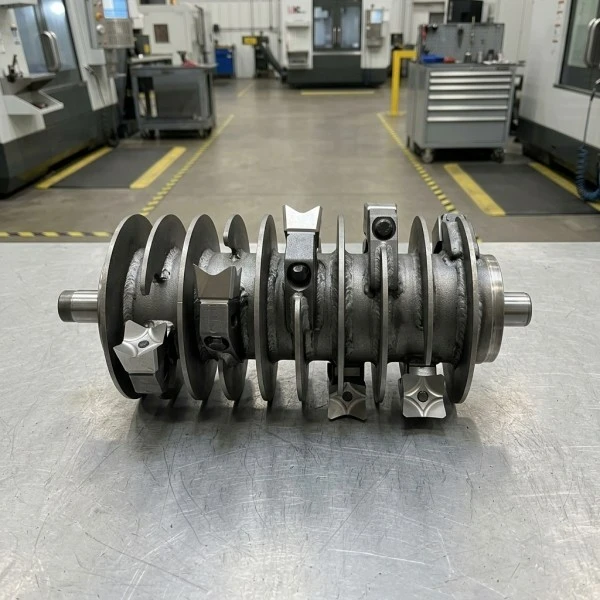
Let’s start with the basics. What is a skirt belt machine, exactly? For anyone new to the space, it’s a specialized industrial conveyor component with a reinforced, flexible belt fitted with vertical skirts along the edges. These skirts contain bulk materials (like rock wool, gravel, or gypsum) during transfer, preventing spillage, reducing material waste, and minimizing safety hazards from loose debris. While core functionality matters, the interface that operators use to control, monitor, and maintain this equipment is where user-friendliness takes center stage — and where so many older, outdated machines fall short.
Over the past decade, I’ve watched as our industry shifted from analog, hard-to-calibrate controls to digital, intuitive systems. Early skirt belt machines relied on dials, switches, and paper-based log books — operators had to manually adjust belt tension, track wear and tear, and respond to issues like misalignment by cross-referencing spreadsheets. That was not only slow; it left room for human error, which could lead to 10+ hours of downtime and thousands in lost materials. Today, however, the best skirt belt machine interfaces are built with the operator in mind — and that’s a priority we’ve built into every machine we ship.
Let’s break down what makes an industrial machine interface “user-friendly” for the teams that run, maintain, and repair these systems. First, it needs to reduce cognitive load. Operators aren’t always engineers — many come to the role with vocational training focused on equipment operation, not advanced coding. Our current Skirt Belt Machine interfaces use a 10-inch touchscreen with large, high-contrast icons, no tiny text, and menu structures that follow a logical flow. You don’t have to navigate 5 submenus to check belt speed; the core controls are front and center: start/stop, speed adjustment, and real-time status alerts. For night shifts or environments with poor lighting, the screen has a night mode that dims automatically but keeps critical data visible — a small detail that makes a huge difference for tired operators.
Another key feature of a user-friendly interface is proactive feedback. If a skirt starts to wear thin, or the belt is misaligned, the system doesn’t just throw a generic “error code 42” at the operator. It sends a plain-language alert: “Left skirt at station 3 showing uneven wear; scheduled maintenance window is 72 hours out.” It also pulls up a quick guide on the screen that tells the operator how to inspect the area, or how to adjust the skirt tension, without making them look through a 500-page manual. This type of feedback cuts down on troubleshooting time and means operators don’t have to rely on external experts for every small issue. That’s especially important for small to medium-sized manufacturing teams that might not have a full-time maintenance staff.
But user-friendliness isn’t just for day-to-day operation — it also matters during installation and maintenance. When our team sets up a new Skirt Belt Machine at a client’s facility, we don’t leave them with a manual written in jargon. The interface has a setup wizard that walks even a new maintenance tech through calibrating the belt, adjusting skirt height, and syncing the machine’s controls to the factory’s existing power supply. For routine maintenance tasks, like replacing worn skirts or cleaning the system, the interface stores step-by-step checklists that the operator can follow, complete, and log digitally — no more paper forms that get lost or outdated. This is why we’ve seen so many teams transition from older equipment after struggling with overly complex maintenance processes.
Of course, we don’t operate in a vacuum. Our clients often use a range of other industrial equipment in their lines, so the Skirt Belt Machine’s interface needs to integrate seamlessly with those tools. For example, if a client runs a rock wool processing line, we know they might use a range of related equipment: a Reclamation Tool Shaft Assembly to process leftover material, a Water-cooled Tuyere Sleeve For Cupola Furnace to regulate high temperatures, a Pneumatic Rock Wool Conveyor to move materials between stages, a Rock Wool Polishing Machine to refine the final product, or a Long-lasting, Durable Gravel Roller if they also process construction materials. The Skirt Belt Machine’s interface can sync with all of these tools, so the operator can control every piece of equipment from one screen instead of switching between multiple interfaces. That level of integration isn’t just convenient — it reduces mistakes that happen when a operator is juggling multiple control panels.
I’ve heard the argument before: “Industrial machinery interfaces have to be complex to be effective.” But that’s a myth. The most effective interfaces are simple. Let’s talk about what happens when an interface is not user-friendly. Last year, we worked with a mid-sized rock wool manufacturer that had invested in a competing skirt belt machine with a clunky, overcomplicated interface. Their operators would spend 20 minutes every morning calibrating the belt, because the controls required 3 separate steps to adjust tension, plus a manual cross-check with a separate measuring tool. That meant the line had to start 20 minutes late every day, which added up to more than 50 hours of lost production per month. After they switched to our Skirt Belt Machine, the calibration process takes 2 minutes — a tap on the screen, and the system automatically adjusts tension and verifies alignment. The operators told us that the difference was night and day; they had more time to focus on quality control instead of fighting with the machine.
Another common complaint we hear about old interfaces is that they’re not adaptable. As a manufacturing business grows, its needs change. An operator might move to a new shift, or the plant might expand to process a new type of material. A user-friendly interface allows for easy customization — you can adjust alert thresholds, add new material profiles, or set up different access levels for senior operators vs. new hires. For example, if a plant starts processing both rock wool and gravel, the Skirt Belt Machine’s interface can save two separate material settings, so the operator can switch between them with one tap, instead of re-calibrating every time. That flexibility is built into our design — we don’t lock clients into a one-size-fits-all system.

But let’s be honest: no interface is perfect. Early versions of our Skirt Belt Machine interface had a few small flaws. For example, the touchscreen was a bit too sensitive, which led to accidental taps when operators were wearing work gloves. We fixed that by adjusting the sensitivity settings and adding a “gloves mode” that requires a slightly firmer tap — a simple fix that came directly from operator feedback. That’s the key to building a truly user-friendly interface: it’s not designed in a conference room by engineers; it’s designed with input from the people who actually use the machine every day. We test every new interface with a group of operators from different manufacturing backgrounds, and we incorporate their feedback before we roll out any changes. That’s why our interfaces keep getting better, because we’re not just guessing what operators need — we ask them.
Safety is another big part of user-friendliness. Operators don’t want to waste time fighting a machine, and they definitely don’t want to put themselves at risk. A good interface will not only alert operators to hazards — it will also have built-in safety protocols that prevent the machine from running if something is wrong. For example, if a skirt is misaligned to the point where it could spill material or cause a jam, the interface won’t let the operator start the machine until the issue is fixed. Older systems would let operators override safety settings, which could lead to serious accidents. Our system has a lockout feature that requires a supervisor’s code to override critical safety alerts, which gives operators peace of mind and plant managers the assurance that safety protocols are followed.
Now, I know some of you might be thinking: “Sure, the interface is great, but what about reliability?” That’s a fair question. A user-friendly interface means nothing if it breaks every other week. Our Skirt Belt Machine interfaces are built with industrial-grade components, so they can handle the dust, heat, and vibration of a factory floor for years. We also offer remote access, so if an operator is stuck with a minor issue, our support team can log into the interface remotely to walk them through the fix, instead of sending a technician out for every small problem. That’s another convenience that makes the interface more user-friendly — you don’t have to wait around for support when you can get help in minutes.
At the end of the day, the question of whether a Skirt Belt Machine has a user-friendly interface comes down to this: does it make the operator’s job easier, not harder? Does it reduce downtime, minimize errors, and keep people safe? For us, the answer is yes. We’ve designed our interfaces with the needs of factory teams in mind, because we know that when operators can work efficiently, the whole plant runs better. If you’re in the market for a Skirt Belt Machine, or if you want to upgrade your current system to a more user-friendly interface, we’re here to help. We work with clients across a range of industries, from rock wool production to construction materials processing, and we can tailor our equipment to fit your specific needs.
Don’t let outdated, complicated machinery slow your team down. Reach out to us to learn more about our Skirt Belt Machines and how our intuitive interfaces can transform your production line.
References
- Industrial Conveyor Interface Design: Operator-Centric Principles, Journal of Manufacturing Systems, 2021
- Rock Wool Production Line Integration: Equipment Synergy and Efficiency, International Journal of Industrial Engineering, 2022
- Industrial User Interface Usability: A Study of 50 Manufacturing Sites, Human Factors and Ergonomics Society, 2020
- Maintenance Efficiency and Digital Interfaces: A Case Study of Conveyor Equipment, Manufacturing Engineering Journal, 2023